


A Google Ads conversion is a valuable action someone takes after interacting with your ad: a call, a form submission, a booking request or a purchase. You decide which actions count when you set up tracking. To get more of them, you need three things in order: tracking that records the right actions, bidding built on that data, and a landing page that makes the next step easy. We run Google Ads for local businesses on the Treasure Coast, and this is the order we work through.
TL;DR
- A conversion is an action you define as valuable, such as a call, a quote request or a purchase. Clicks alone are not conversions.
- Set up tracking first. Google’s Smart Bidding learns from your conversion data, so wrong settings send it in the wrong direction.
- Pick one lead-stage goal, such as “request quote” or “book appointment,” and give it enough volume (15 conversions a month is Google’s guideline).
- Most conversion problems after tracking are landing page problems: the ad promises one thing and the page delivers another.
- Our Google Ads service covers setup and management for local businesses.
Table of Contents
- What counts as a conversion in Google Ads
- How Google counts conversions (and what 0.5 means)
- Set up conversion tracking so the data can be trusted
- Choose the right goal: lead stage, not just form fills
- Maximize conversions, Maximize conversion value, Target CPA and Target ROAS
- Improve Google Ads conversions after the click
- A monthly routine for conversion review
- How we help local businesses with Google Ads conversions
- FAQ
- Sources
What counts as a conversion in Google Ads
Google describes a conversion as a click on your ad followed by an action on your site that you consider valuable, such as a purchase, a newsletter sign-up or a request for more information. Google says you define what counts when you set up conversion tracking. Its help documentation also lists calls, lead form submissions and app downloads as conversion types.
For a local service business, the useful conversions usually look like this:
- A phone call from the ad or from your website
- A completed contact, quote or booking form
- A click on a “get directions” or “call now” button
- An online purchase, if you sell products
A page view or a click on a blog post is rarely worth counting as a conversion. If you count weak actions, Google will find you more of them, and your report will look good while the phone stays quiet.
How Google counts conversions (and what 0.5 means)
The “Conversions” column in your account shows conversions across all the actions you’ve chosen to include. Google’s own guide to analyzing Google Ads points to related columns worth watching: cost per conversion, conversion rate, total conversion value and conversion value per cost.
Two settings change what you see.
Every conversion or one conversion
Google’s conversion counting options work like this. “Every” counts each conversion after a click, which suits sales. “One” counts a single conversion per click, which suits leads, because one person submitting your form three times is still one lead. Defaults differ by source: every conversion for website actions, one conversion for calls and app installs. Check the setting on each action rather than assuming.
Why you see decimals
If your account uses an attribution model other than last click, credit for a sale is split among the ad interactions that contributed. That is why you may see a 0.5 or 0.33 in the column. Google’s attribution guidance explains that this produces fractional credit. It also notes that after you switch models, very recent conversions can dip temporarily because of time lag. A dip right after a change is not by itself a sign that something broke.
Set up conversion tracking so the data can be trusted
Google’s campaign setup guide boils tracking down to three steps: create a conversion action, copy the tag (a small piece of code), and paste it on your website. The steps are simple. The mistakes happen in the choices around them.
- Choose the action that reflects a real lead. A form submission on a thank-you page is more meaningful than a button click. A call of a meaningful length is more meaningful than any call.
- Mark primary and secondary correctly. Google warns that primary (biddable) and secondary (observation-only) settings are critical, because Smart Bidding relies on those signals. If a low-value action is marked primary, the system optimizes toward it.
- Put the tag where it fires once, at the right moment. A tag on a page that loads without a completed action inflates your numbers. A tag missing from a page that does count undercounts them.
- Test with a real submission. Fill out your own form and place a test call, then confirm the action shows up in the account.
- Add enhanced conversions. This feature sends hashed first-party data, such as an email address, to improve the accuracy of your measurement. Search Engine Land reported in April 2026 that from June 2026 Google consolidated enhanced conversions for web and for leads into a single on/off toggle, so you no longer pick an implementation method.
Tracking is also where a Google Ads account most often goes wrong without anyone noticing. A broken tag looks like a campaign that stopped working. When we manage an account, setup and tracking are part of what our Google Ads service covers, so the numbers you review are numbers you can act on.
Choose the right goal: lead stage, not just form fills
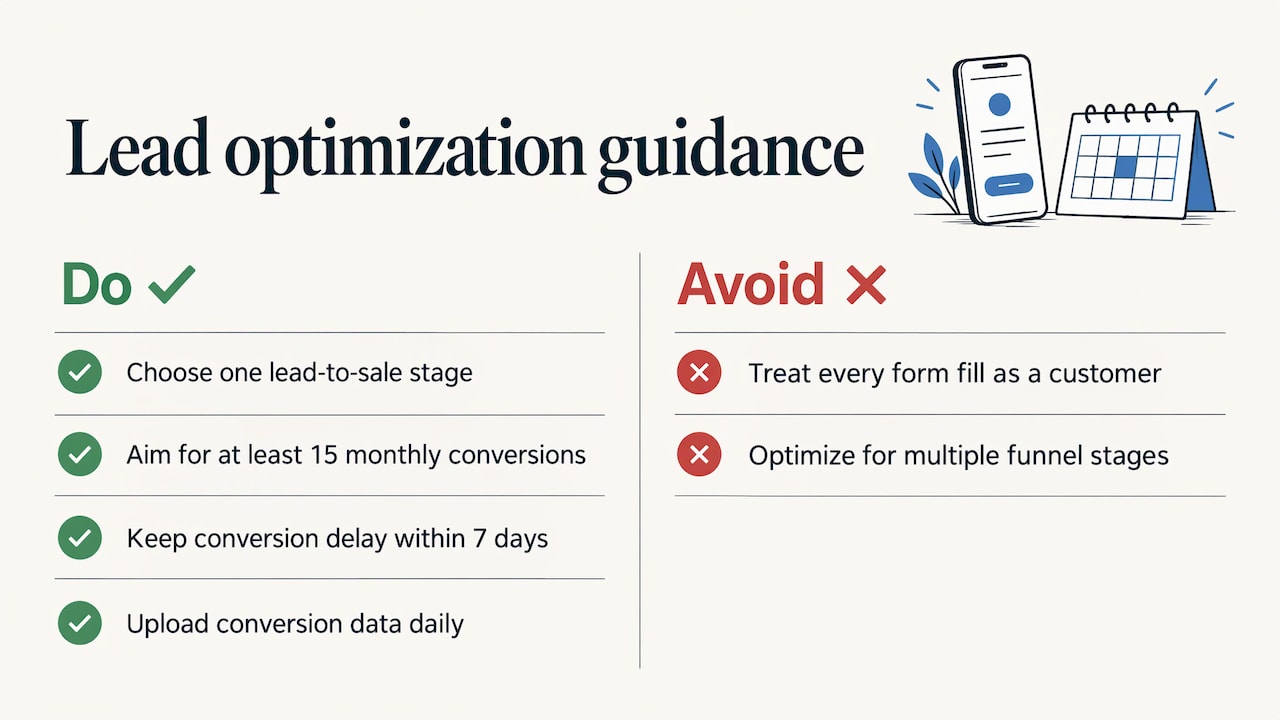
A form fill is not a customer. A local contractor may get ten requests and win two jobs. Google’s guide to high-quality leads recommends choosing goals such as “qualified lead,” “book appointment” or “request quote.” It also says the action should have at least 15 conversions in the last 30 days at the account level, and ideally happen within 7 days of the ad interaction.
Google’s conversion value guidance adds that you should select a single stage of the lead-to-sale funnel as your optimization goal, with a short conversion delay and at least 15 monthly conversions. It also recommends uploading conversion data often, ideally daily.
A worked example
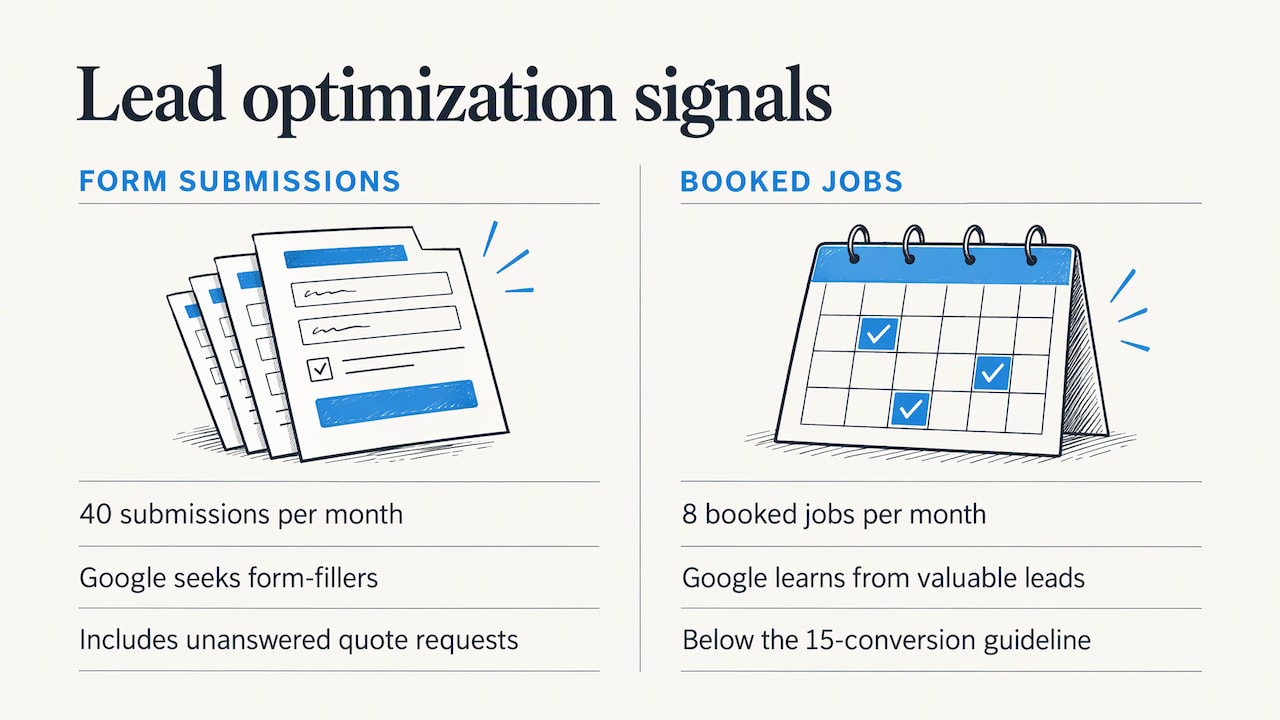
Say a Stuart HVAC company gets 40 form submissions a month from ads, but only 8 become booked jobs. If it tells Google only about form submissions, Google looks for more people who fill out forms, including people who want a quote and never answer the phone. If the company instead tracks “booked appointment,” the system learns from the leads that matter. The catch: 8 a month is below the 15 guideline. In that case the company can start with a stage that happens more often, such as qualified call or quote request, and move down the funnel as volume grows.
Give each conversion a value
Assigning values lets you see business value, not just counts. Google recommends at least 2 unique values across at least 2 different actions for static values, or transaction-specific values where you can pass them. A booked job might be worth $400 on average and a quote request $60. Even rough numbers change what the system favors.
Maximize conversions, Maximize conversion value, Target CPA and Target ROAS
These are the bidding strategies readers most often confuse.
| Strategy | What it aims to do | Fits when |
|---|---|---|
| Maximize conversions | Spend your budget to get as many conversions as possible | Every lead is worth about the same |
| Maximize conversion value | Spend your budget to get the highest total conversion value | Different actions or jobs have very different values |
| Target CPA | Hold the cost per conversion near a number you set | You know what a lead can cost |
| Target ROAS | Hold return on ad spend near a goal | You track revenue per conversion |
The first two definitions come from Google’s page on Maximize conversions bidding, which also says to use Target CPA or Target ROAS if you have a specific return goal. The same page notes that from June 2026 the labels “Maximize conversions with a Target CPA” and “Maximize conversion value with a Target ROAS” became simply “Target CPA” and “Target ROAS.” Bidding behavior did not change and advertisers need take no action. If you read older tutorials with the long names, they are describing the same strategies.
For a small account with limited data, Google’s setup guide recommends starting with Maximize conversions. Once you have steady volume and values attached to your conversions, a target strategy gives you more control.
Improve Google Ads conversions after the click
With clean tracking and a sensible goal, the rest is about what happens between the click and the form.
Reallocate toward what converts
Google advises that once you track conversions, you move budget toward the keywords that produce more of them. In practice, review the search terms report monthly. Pause terms that spend without producing leads. Add the phrases that match how customers actually describe the job, such as “AC repair Port St. Lucie” rather than a generic trade name.
Send each ad to the most relevant page
The same Google page says each ad’s landing page should direct people to the most relevant, ideally dedicated, page on your site. An ad for “emergency water heater replacement” should land on a page about water heater replacement. A home page makes the visitor hunt.
A landing page that converts usually has:
- A headline that repeats what the ad promised
- A phone number and a short form visible without scrolling on a phone
- Proof near the action, such as reviews, licenses and local photos
- One clear next step, not five
- Fast loading, since mobile visitors leave slow pages
If your clicks are real but the leads are not, our article on why Google Ads get clicks but no sales walks through the usual causes. For the page itself, see how conversion-focused design improves lead generation.
Make the lead worth having
A longer form or a qualifying question lowers volume and raises quality. A short form raises volume and can invite junk. Match the form to your sales capacity. If you can only handle ten jobs a month, chasing a hundred form fills does not help you.
Review reputation signals
People often check reviews before they call. Strong reviews raise the share of visitors who act. Our piece on why your online reputation may not be converting leads covers that link.
A monthly routine for conversion review
A small business does not need a daily dashboard habit. A monthly pass is enough.
- Confirm tags still fire by submitting a test form and placing a test call.
- Compare conversions in the account with leads in your own inbox and phone log. If the two disagree by a lot, fix tracking before changing anything else.
- Check cost per conversion by campaign, not just the account total.
- Read the search terms report and add negative keywords for irrelevant searches.
- Ask which leads became jobs. If you can, feed that back as a conversion value.
- Change one thing at a time on the landing page so you know what worked.
That last step matters. Changing the headline, the form and the offer all at once tells you nothing about which change helped.
How we help local businesses with Google Ads conversions
We design websites and run search marketing together, so the ad, the landing page and the tracking are planned as one system rather than three separate jobs. Our approach is tailored to each business and focused on measurable results. If you want a second pair of eyes on what your account is counting now, we offer audits and consultations, and our Google Ads page explains the setup and management service.

If the landing page is the weak link, our website design work is built around turning visitors into leads. For businesses in Port St. Lucie, the Google Ads agency page describes how we work locally.
FAQ
What does a conversion mean in advertising?
It is a valuable action a person takes after seeing or clicking an ad. In Google Ads, you choose which actions count, such as a call, a purchase or a quote request. Anything you don’t define as a conversion isn’t measured as one.
What does 0.5 conversion mean in Google Ads?
It usually means conversion credit was shared between ad interactions under a non-last-click attribution model. Google says these models split credit and produce decimals in the Conversions column. It does not mean half a customer called you.
What is the difference between Maximize conversions and Maximize conversion value?
Maximize conversions aims for the highest number of conversions within your budget. Maximize conversion value aims for the highest total value, so it favors higher-value actions. Use the second when your conversions carry different values, such as a $60 quote request and a $400 booked job.
How many conversions do I need before bidding works well?
Google’s lead guidance suggests an action should have at least 15 conversions in the last 30 days at the account level. If you are below that, start with a goal that happens more often, then move deeper into the funnel as volume grows.
Sources
- What to track based on your advertising goals – Google Ads Help
- About conversion measurement – Google Ads Help
- How to analyze Google Ads successfully – Google
- About conversion counting options – Google Ads Help
- Best practices for managing attribution model changes – Google Ads Help
- Set up your campaign for success – Google Ads Help
- About enhanced conversions – Google Ads Help
- Google Ads simplifies enhanced conversions into a single switch – Search Engine Land
- Best practices for generating high-quality leads – Google
- Conversion Values Best Practices – Google Ads Help
- About Maximize conversions bidding – Google Ads Help

